

ANNE Hasher: The Ultimate Proof of Space Time Hasher
ANNE Hasher is a CPU/GPU intensive hard drive plotting software and pre-mining Proof of Spacetime tool for ANNE brought to you by ANNE Media – a part of toolkit for setting up your decentralized annode environment.
Download ANNE Wizard instead, and started with ANNE Node, ANNE Hasher, and ANNE Miner in minutes.
*Security note: As free open-source software, ANNE Hasher is not signed with a paid certificate. Windows or macOS may show a warning on first launch. This is expected and the app is safe.
Prepare Your Drives for Hard Drive Mining
Before you can start mining with ANNE Miner, your hard drives need to be prepared. ANNE Hasher is the hard drive plotting software that fills your disks with pre‑computed cryptographic solutions called nonces. This is a one‑time process per drive, and it is the only step in ANNE mining that requires significant computational power. Once your drives are plotted, ANNE Miner can read them using negligible energy.
Unlike mining itself, which is low‑energy and runs quietly in the background, plotting is CPU and GPU intensive. You run ANNE Hasher once per drive (or per portion of a drive you want to allocate), let it work, and when it finishes, that space is ready for months or years of mining. You do not need to plot an entire drive – you can allocate as much or as little space as you want. You can add more plotted space later by running ANNE Hasher again on the same drive or on new drives.
What ANNE Hasher Does
- Creates plots – As a hard drive plotting software, ANNE Hasher generates cryptographic plots on your hard drives. Each plot consists of many nonces, and each nonce contains 4096 scoops of 64 bytes each. These plots are what ANNE Miner later reads to compute deadlines.
- Uses your account identifier – The plots are keyed to your ANNE account. When you plot a drive, you provide your ANNE account identifier (NID), and the hashes are generated using it. This ensures that your plots are tied to a single ANNE identity and cannot be used by anyone else.
- Runs on CPU or GPU – Plotting is computationally intensive, so ANNE Hasher can use both CPU and GPU resources to speed up the process. The more powerful your hardware, the faster your drives will be plotted, though your hard drive’s write speed is often the limiting factor.
- One‑time per drive – Once a drive is plotted, it never needs to be plotted again. You can use it for mining indefinitely. If you add a new drive later, you run ANNE Hasher on that drive once, and it joins your mining capacity.
Benefits of Plotting Your Drives
- One‑time work, ongoing rewards – The heavy computational work happens only once. After plotting, your drives generate mining income with negligible electricity consumption.
- No ongoing CPU/GPU load – Unlike CPU mining or GPU mining where power is consumed continuously, ANNE Miner reads plots with minimal system impact. Your computer stays fully usable for other tasks.
- Uses spare disk space – You do not need dedicated mining hardware. Any spare space on existing drives can be plotted and used for mining.
- Portable – Once a drive is plotted, you can move it to any computer running ANNE Miner. Your plots are tied to your account, not to the machine that created them.
- Future‑proof – Plots created today will work with ANNE Miner throughout your HDD lifespan. There is no planned obsolescence.
How to Plot Your Drives with ANNE Hasher
Getting started with hard drive mining is straightforward. You will need ANNE Hasher to create your plots, ANNE Node to maintain connection to the network, and ANNE Miner to read the plots and submit deadlines. The process looks like this:
- Install ANNE Hasher, ANNE Node, and ANNE Miner – The easiest way is to run the ANNE Wizard, which installs all three tools. If you prefer manual installation, downloads are available for Linux, macOS, and Windows.
- Choose your drives – Decide which drives you want to dedicate to mining. They can be internal hard drives, external USB drives, or even SSDs.
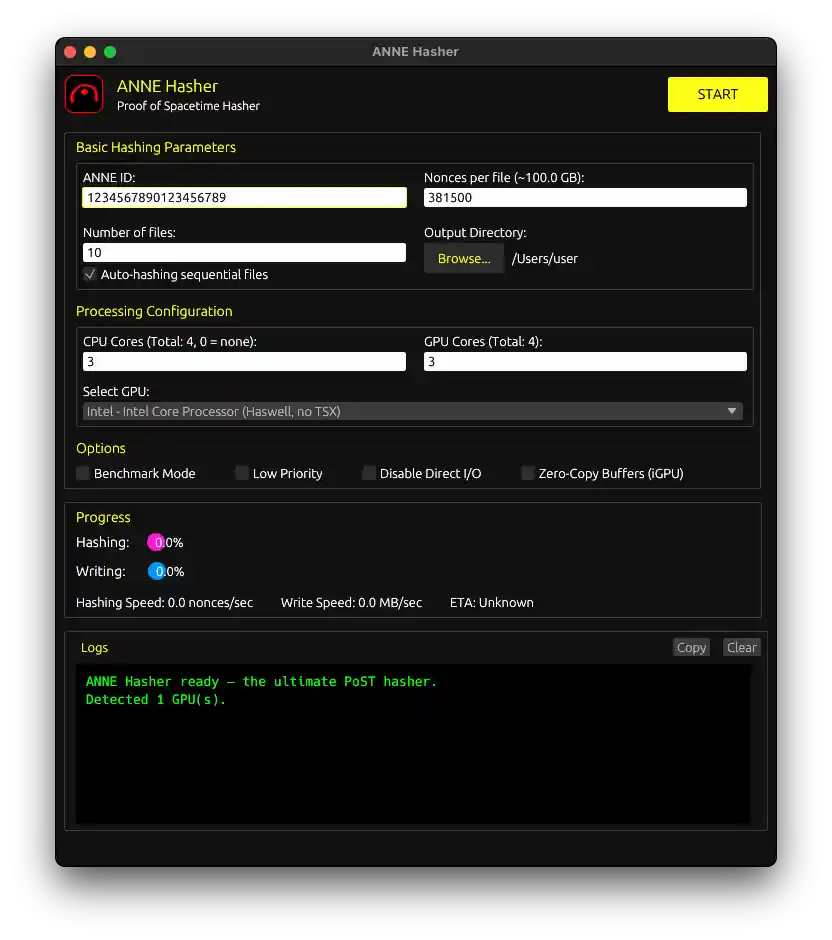
- Run ANNE Hasher – Launch the tool and point it to the drives you want to plot. You will need to provide your ANNE account identifier (NID). The software will begin generating plots, filling each drive with pre‑computed nonces. This can take hours or days depending on the size of your drives and your hardware. Plot in smaller chunks, e.g. 100-500GB in case you want to interrupt the process and resume later.
- Monitor progress – ANNE Hasher shows you its progress, estimated time remaining, and performance metrics.
- Start mining – Once plotting is complete, launch ANNE Miner and point it to your plot directories. ANNE Miner will begin reading your plots, computing deadlines, and submitting intents to the network. Your ANNE Node must be running for the miner to communicate with the network.
Plotting Tips
- Plot directly on your mining drives – Plotting writes large amounts of data, so it’s most efficient to plot directly onto the drives you will use for mining. This avoids the time‑consuming step of copying plots between drives later. If you have a fast temporary drive (like an SSD), you can plot there and then transfer, but be aware that transfer time will add to your total setup time. For most home miners, plotting directly on the destination HDD is the simplest approach.
- Start small, add more later – You do not need to plot an entire drive before you start mining. Allocate a chunk of space on one drive, let it plot, and begin mining with that. While your miner runs, you can use ANNE Hasher to plot additional space on the same drive or on new drives. You can gradually increase your total plot size over time without interrupting your mining. Just restart your miner after each plotted chunk.
- Consider external drives – External USB drives work perfectly for mining. You can build a large array of inexpensive external drives over time.
- Don’t max out your system – Running ANNE Hasher at 100% CPU and GPU utilization for hours or days can cause instability, especially on older hardware or laptops. It can freeze or crash your system. Leave some headroom. If you are plotting on a laptop, be extra careful – sustained high load can overwhelm cooling and lead to thermal throttling or shutdowns.
After Plotting
Once your drives are plotted, you are ready to mine. Here is what you can expect:
- ANNE Miner takes over – The miner reads your plots, computes deadlines, and submits intents. Your CPU usage will be minimal, and your drives will be read regularly.
- Rewards start accumulating – When your miner wins a block (solo) or is selected as a share winner, annecoin is deposited into your wallet.
- You can add more drives anytime – When you acquire new storage, run ANNE Hasher again on the new drives. They will join your existing plots, increasing your mining capacity.
- No replotting needed – Your existing plots never need to be regenerated. They will work forever.
Other projects from ANNE Media

ANNE Wizard
ANNE installation suite

ANNE Miner
Low-energy mining client

ANNE Talk
Forum for all things ANNE

Kuno
Peer-to-peer crowdfunding platform
Support
ANNE Media is a sovereign non-profit organization. All our expenses are covered by user donations. If you like using our products, please support us.
Thank you kind sir or ma’am

84VrmTNQq4hbfBQce5LfUe8BHmBFSDKHHFcSws6FRa9oiDUQANBkRnKYChabe9HRYUVAu9tcojXNFJL484KQPdJFCxRecbP
Contribute and Earn Annecoin
ANNE Hasher is open-source software. If you have skills and want to help improve it, we welcome your contributions. Let’s talk at ANNE Talk.
Join ANNE community
We think ANNE Talk is the best place to join the ANNE ecosystem, and we would be delighted to have you as part of our community.